
Official Evaluation and performance eval periods
First half of the year:
Evaluation period: Dec 1 - May 30
Performance Evaluation: June 1 - 15
Second half:
Evaluation period: June 1 - Nov 30
Performance Evaluation: Dec 1 - 15
As of: 2024-07-24
Mantis - My Status page
START DATE: FEB. 17, 2025
Goals
- meet company SLA
- will be used during semi annual evaluation
- transparency
- self-evaluation
- monthly issue analysis
Usage
- all computation is in Hours
- Class S = should be done within 4 hours to be on time;
- Class A = should be done within 1 day (9 hours) to be on time;
- Class B = should be done within 2 days (18 hours) to be on time;
- other types are not included in the list
- handler time = the total time that the ticket is assigned to the handler up to resolve time - feedback time - weekend time
- ticket time = total time that the ticket is opened up to closing time - feedback time - weekend time
- handler and ticket status = hours over the SLA | on time when within SLA
- handler status % = total on time ticket count / total ticket count [within the date filter]
suggestion
- if we are waiting for client/mall/bir/third-party feedback, make sure to set the mantis status to 'feedback'.However, only set the status to feedback if we are waiting for the client/mall/bir/third-party.
- before closing the ticket make sure that the type and sub type are correct and that the issue handler is always assigned to the correct person
- if a class S is opened, speed up the process by informing the other departments if there are updates with the ticket's status.
- HD should update the devs once the ticket is assigned.
- Devs should update the HD once the issue is resolved.
- In case a task is delayed (over the SLA) be sure to make time to explain in detail the reason why the task is delayed in the Notes section.
- There are some issues that are reported by the users to be bugs but in reality aren't bugs. Some issues are just features that are not supported yet. Some are for optimization. for these cases, set the classification of these issues into "core feature update".
Updated Evaluation Targets
Target changes for July 2024 onwards:
- We will now have a target number of sprints per evaluation period: 8 sprints.
- Based on the number of sprints, each position will now have a target set of points per sprint which are:
Software Engineer 1
points per eval: 156
points per sprint: 19.5
adjusted target: 10
Software Engineer 2
points per eval: 192
points per sprint: 24
adjusted target: 12
Software Engineer 3
points per eval: 228
points per sprint: 28.5
adjusted target: 14
SV 1
points per eval: 120
points per sprint: 15
adjusted target: 7.5
- Targets are adjusted to accommodate issues/bugs reported
- Keep in mind that targets may be adjusted in the future as the project matures and the bugs/issues are minimized.
- Affected Teams: CIRMS C#, Core C#, Support
Attention: All Clients to have WeChat groups
All clients will have a wechat group that includes the following:
- All HD WeChat accounts
- Collection team including Emily's (E65818989) WeChat accounts
- Internal technician WeChat accounts
The format for each group name is: yymmdd clientid clientname | Nelsoft
- The date portion in the group name is the client's maintenance expiry date.
- The expiry date for the whole group is the earliest expiration date in the whole client group.
Once the maintenance period has passed, we will give the client another 2 weeks to pay for the maintenance. If the client still hasn't paid by then, all hd and tech accounts will leave the group and only the collection team accounts will be left.
Additional changes:
- All concerns should be directed in the group chat.
- This process will be implemented immediately.
- Initially, the help desk will start by creating groups for clients that are not yet expired.
- All clients will be briefed regarding the process in the group chat once it's implemented.
- We should warn the client one last time a few days before the period of 2 weeks expires.
- All reported issues will still be supported even after expiration.
For new clients:
- should automatically have WeChat groups upon addition to the client base.
- the expiry date is 1 year after the following month that the client is added.
- If the client is added by June 4, 2019, the expiry date is July 1, 2020.
March 1: Strict Implementation of Maintenance subscription rules
Before March 1, Nelsoft has already been making announcements regarding the strict implementation of the maintenance subscription rules. The rules state that by March 1, the clients who have expired subscriptions will not be supported. The services encompass everything except the issues that are already existing before March 1. For better understanding here is a sample table of the services blocked when clients have expired subscriptions.
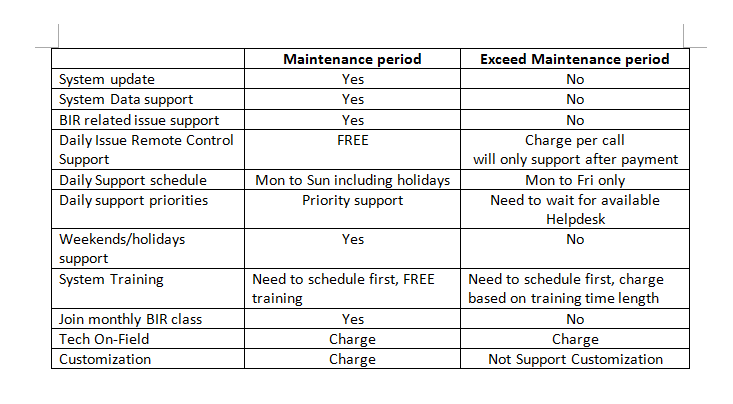
Like all subscription based services, once the client is paid, all support services are provided. So for all help desk personnel, make sure to check the client base system first, if the client is paid, before providing any support.
We will only continue supporting a client once a payment is made.
Here are some answerst to questions that you might have:
-The maintenance is paid per branch and new branches within the maintenance period are supported which means that some branches are supported and some aren't.
-The Client's system can't be updated as long as some branches have an expired subscription.
-YES, even issues with CLASS S urgency are not supported.
-YES, even BIR issues are not supported.
-Hardware issues can be supported as long as the hardware is under warranty regardless if the client is subscribed.
-In case the client wants to ask for a support quotation, the rate is the same if they asked for a customization. The client will only be supported after the quotation has been fully paid.
-Clients with paid subscription will be prioritized over those who will only pay per issue.
-Clients can't schedule training within the office.
-Issues that are already existing before March 1 will still be supported even if the client is not subscribed.
Sending of manual guide for basic troubleshooting of reported minor issues
As discussed together with the management, it was decided that we will now be sending PDF files containing solution(s) for minor issues reported by the clients. This covers the following:
1. HOW TO USE AUTOSYNC V5.0
2. UNABLE TO CONNECT TO THE WEB SYSTEM
3. CASH DRAWER IS NOT OPENING
4. HAMACHI IS OFFLINE
5. HAMACHI TUNNELING ENGINE FAILED TO START
6. HOW TO CONNECT TO OTHER BRANCHES USING HAMACHI
7. HOW TO INSTALL EPSON LQ-310
8. HOW TO INSTALL POSTEK (PT-RP76)
9. HOW TO INSTALL POSTEK AND TSC BARCODE PRINTER
10. HOW TO INSTALL THERMAL&NON-THERMAL PRINTER
11. HOW TO SET BARCODE STICKER SIZE
12. HOW TO SET IP TO STATIC
13. HOW TO SET PAPER SIZE IN THERMAL AND NON-THERMAL PRINTER
14. HOW TO SET PAPER SIZE IN WEB SYSTEM
15. HOW TO SHARE PRINTER TO ANOTHER COMPUTER WITHIN THE NETWORK
16. OR CONTENT CHECKLIST
17. POS PRINTER UNABLE TO PRINT
18. PRINTER DRIVERS
19. HOW TO FIX BARCODE SKIPPING ROWS
Kindly inform the client that minor issues will be resolve by them or anyone on their side by following the steps indicated in the document. Click this to get the link to the said topics. Kindly copy the link per file before sending to client by clicking the “Share” button then “Copy link” or you may send it via e-mail too.
More information: PDF Files for Screenshot Solution
Mandatory checking for reported issue(s) before, during and after server setup, re-host and/or update
As practiced, both developers and help desk have steps and procedures to follow before, during and after the scheduled server setup, re-host and update. Sometimes, we cannot avoid instances wherein even after following the given steps and procedures, there are still errors, discrepancies and/or lapses in the final output.
We are all aiming to provide quality products and services to our valued clients, to continue doing so, we will now be implementing a mandatory and in-depth checking for those instances. Should there be any issue(s) encountered before, during and after the said orders, kindly inform Kryza Garra and/or Robi Kerr Navarro for double checking of the issue(s). With this, we can all help build the trust of our clients and achieve our goals.
Incident report for back jobs and POSD activation during setup
INCIDENT REPORT FOR ISSUES WITH ONE OR MORE BACK JOBS
Effective immediately, all issues with one or more back job needs a corresponding incident report from the reporter of issue and developer who fixed it separately. This is to keep track of all redundant issues that were resolved already but keeps on coming back due to unknown instances or recurring problems after fix. Said incident report must be submitted on the same day that the client reported the issue again.
POSD ACTIVATION DURING POS SETUP
Due to various reports this past months related to POS, both help desk and dev team, especially the persons involved in the setup must know first the following:
1. If client requested for a POSD, kindly make sure that the percentage mentioned has been set correctly and autoswitch and autoxz must be set to 1.
2. If for instance, there is no clear information about it, kindly approach help desk wherein they can refer to the existing branches or directly asked the salesman.
3. For POS to be setup inside malls, POSD must not be activated as it needs to show 100% of the total daily sales to the Mall Administrator.
4. For double checking and access limitation purposes, kindly make sure that only the manager or the person assigned by the owner will be the one to undergo POSD training.
Concerns regarding software version, port 82 and WeChat groups
INCLUSION OF SYSTEM AND/OR SOFTWARE VERSION TO MANTIS TICKETS
For in-depth checking purposes and easy diagnosis of issues occurring on client side, effective immediately, kindly indicate the system and/or software version of the concerned product of NS such as; POS, web system, barcode software and Autosync. It is to be input on “OS Version” text field when creating Mantis report.
NEW USER ACCOUNT ON PORT 82 AND OUTLET INDICATOR
For monitoring purposes, starting today, each Help Desk personnel will use their own account information to login to port 82 and input, view and/or modify necessary details needed. In line with this, there is an additional checkbox within the Branch page which is the “Outlet”. Newly added outlet shall be recorded within branch page and check it to indicate that it is an outlet. This is to avoid instances that existing branch ID for outlets be used on newly created branch.
REPLYING ON WECHAT GROUPS
To ensure efficient customer service, we created WeChat groups per valued clients long time ago already. It is an everyday routine replying on their concerns within the group. Recently, due to many issues occurring to some of our clients, effective immediately, all replies to concerns major or minor raised within the group chat will be send personally on respective sender of the query. This is to avoid the thinking that there are a lot of issues regarding our system.
Deletion of Z-reading and changing of terminal number
DELETION OF Z-READING
Effective immediately, Nelsoft will no longer accept request for the deletion of Z-read. This is not just due to clients’ concern about the deletion charge but also the BIR policy regarding this matter that we need to comply at. Should there be any cases like this or if there is/are still request as such, kindly reiterate to the client that we need to follow the BIR order.
TERMINAL NUMBER FOR CLIENTS WITH NO APPROVED PTU
Due to the time it’s taking our developer, kindly set the POS terminal number to 50 and above before the start of the training and/or if the client has still no approved Permit to Use. Afterwards, the tech assigned or help desk personnel will just simply change the terminal number to 1 and above for succeeding POS but before doing so, kindly take note of the following:
1. Confirm to client if NSI will delete all the sales they had prior to release of PTU
2. Will the inventory be retained?
For cases that tech or developer assigned in setup forgot to change the terminal number and already used terminal number 1 instead for training or without PTU, kindly set it to 11 and above but first ask the client of and/or check the following:
1. Do they already file BIR related reports such as e-Sales and/or supplied data in their POS book?
2. Check first what is the starting terminal number of the branch
3. Item number 2 is important, so that we know what will be the sequence to follow for the additional POS