
Nelsoft's GIT Branching Model
Standard GIT Branching Model
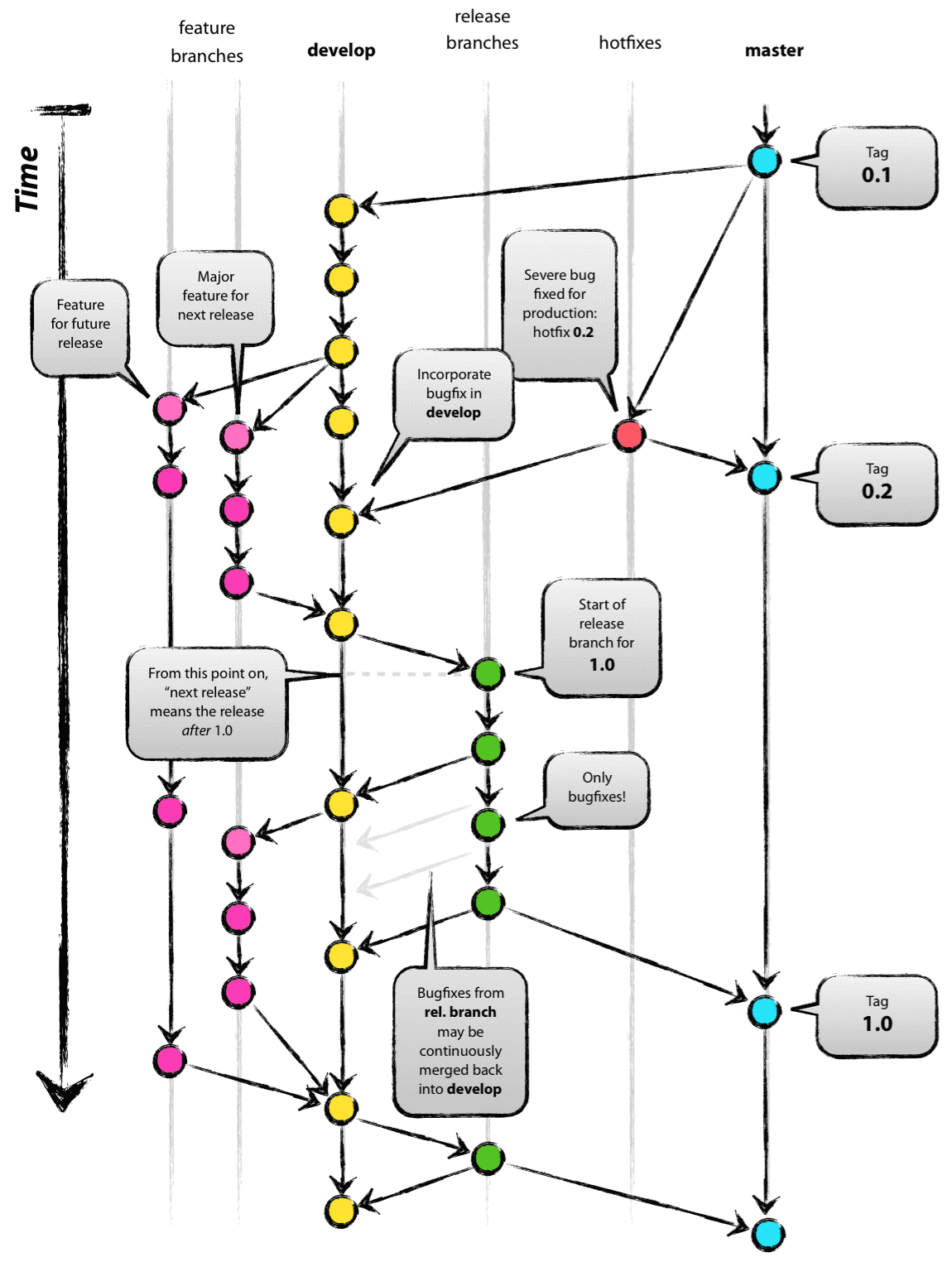
Nelsoft's Methodology
Branches
- Master - Production level version of the system. It means that only thoroughly tested features and/or bug fixes should be merged to this version. Developers can only merge to this branch only thru pull request.
- Hotfix (HF) - Branch out directly from master. For other companies, this branch should only be created for bug fixes. For Nelsoft, all our branches are HF only because we opt to merge features and fixes immediately rather than integrate them all at the same time through a release branch. Therefore, Release branches and Feature branches that were used before are not practiced anymore. The number after the HF prefix is the mantis number that corresponds to the feature/issue. This means that all tasks should have its own mantis reference before proceeding.
- Advanced Version (AV) - Branch out from the master branch. All features created here should be compatible with the master features because clients with an AV branch will be merged back on the next possible version of the core.
- Customized System (CS) - clients with CS branches have customized systems that will not be updated anymore because they have features that are not compatible with the Core system.
- Full customized branch (FCB) - clients that have this branch have a full customized systems 100% not connected to the inventory system.
Branch Naming
Naming format should be branchtype_mantisid_masterversionbranchout
ex: AV_10001/ AV_10001_4.2.0.3
Branch Grouping
Branch grouping should be implemented to cleanly group related branches with each other. For example, all branches related to a client should have its group along with the main branch for that client. The format should be like this:

Branching out
Branching out to create CS branches means that the branch will be treated as its own master branch and will not be merged back to the Core Master branch. This is how customized clients are managed. It means that any updates to the master branch like bug fixes and/or optimizations will not be fixed in the CS branch as well. The AV branches (not in the image) unlike the CS branch, will be merged back to the master branch once the feature has been implemented in the master branch. The AV branches are created to answer the client's needs for rush features that can't be easily merged to master because it has to be planned first for other clients.
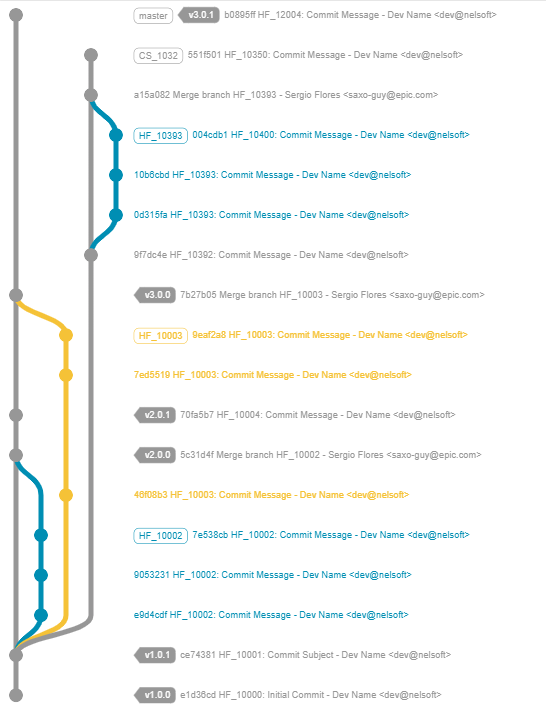
Committing by Feature
Committing should be separated by feature. Again, committing should never be done all at once. For example, there are times that multiple features or issues are within the same mantis number. This allows us to cherry pick per feature and tracking the changes per feature can be easily done. Imagine tracking which files each feature has affected if all of the files are committed at once. This will be checked by the lead and will be rejected once PR is done if the process isn't followed.
Commit message format
- There will be 3 parts for the commit message: subject, references, body.
- Separate subject from the body with a blank line.
- Limit the subject line to 50 characters.
- Add the GIT branch type and the mantis ID to the start of the subject.
- Use the same subject if there are multiple commits for a certain feature or fix.
- Use the imperative mood in the subject line like points A-C and avoid using format from points D and E:
- HF_10000: Refactor subsystem X for readability
- HF_10000: Update getting started documentation
- HF_10000: Remove deprecated methods
- HF_10000: Fixed bug with Y
- HF_10000: Changing behavior of X
- Use the body to explain what and why versus the how of the commit.
Cleaning up branches upon finishing tasks
It's the responsibility of each developer to clean up branches from the origin if unneeded. Examples are finished hotfixes, merged AV's to the master, old CS branches, merged branches to the main CS/AV branches etc.
Pull request
- Pull request will be implemented for the master branch.
- All developers are required to make pull requests on all fixes and features regardless how urgent it is.
- Every end of the day short meetings will be done for discussion of pull request features.
- Urgent requests can be met earlier for approval of the request ASAP.
- Actual process:
- Developer branches out from main branches.
- Developer modifies local branch.
- Developer should not merge the local branch to any of the main branches.
- Developer should ask for the pull request for the local branch.
- Source tree or GIT will push the branch to the origin to be reviewed by the lead.
- After review, the team lead will merge the branch to the main branch in the origin.
- After merging, the team lead should inform the developers that the merge was complete and successful and the developers can delete the local branch in the dev's computer.
Risks
Merging/rebase and conflict resolution
Scenario #1: conflict resolution causes feature/bug fix to accidentally be reverted into older code.

This part of the code (colored red) is already moved to a new position (colored green). When the master branch is merged again to this branch, the code change is reverted to the old arrangement. (See next picture)

After the merge, the lines were back at the 150+ range.

This caused a conflict during the merge. When the dev tried to resolve the conflict, he inadvertently chose the older code to commit.
Solution:
- As a dev handling the conflict with another dev, discuss the conflict with the other dev which part of the code should be kept or not.
- For minor conflicts, do not just check the difference (red or green changes) but also the surrounding code and the effect of the new changes to them.
Sources:
Git image created using: https://github.com/nicoespeon/gitgraph.js/tree/master/packages/gitgraph-js
Attached files: Nelsoft GIT branching model V1.0.2.pdf, Nelsoft GIT branching model V1.0.2.docx, index.bak.php