
Common deployment problems: Autosync
- Branches are offline
- scenario : All connections and settings are all correct and there are no error logs
- Solution: database version number is not existing in either of the databases.
- scenario : All connections and settings are all correct and there are no error logs
- Unable to open autosync
- Scenario: Error message: "Local branch table row is missing"
- Solution: check the branch table if there is a row with WID matching the branchid being used in the autosync settings. If there is, check if the show column is set to 1.
- Scenario: Error message: "Local branch table row is missing"
- Unable to remove or place AutoSync to Windows Startup
- Scenario: Error Message: Folder Access Denied - "You need permission to perform this action".
- Solution: Go to Group Policy Management Editor or type gpedit.msc at Run box. Modify Policy Setting and change all Policy under User Account Control to Disable. See picture below for preference:
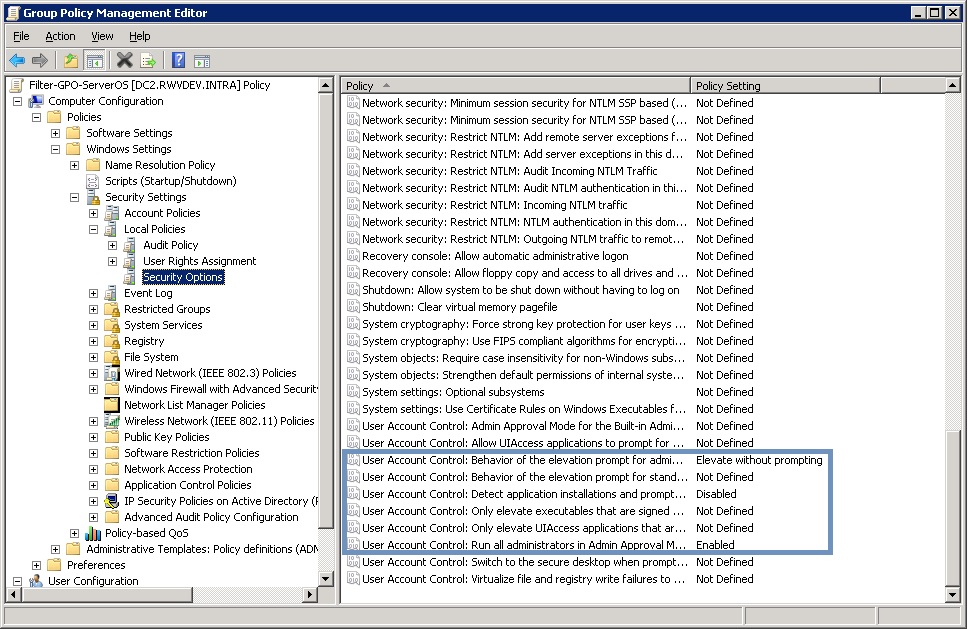
- Note: Restart PC for changes to take effect.
- Source: https://www.techrepublic.com/blog/the-enterprise-cloud/disable-uac-for-windows-servers-through-group-policy/
- Solution: Go to Group Policy Management Editor or type gpedit.msc at Run box. Modify Policy Setting and change all Policy under User Account Control to Disable. See picture below for preference:
- Scenario: Error Message: Folder Access Denied - "You need permission to perform this action".